
Every single type of Phishing attack is explained
9 out of 10 businesses in the UK have experienced phishing attacks in the past year!
Our mission is to help slow this alarming trend by equipping you with the ultimate phishing guide. This guide will explain the various types of phishing attacks and how you can prevent them.
But before diving into the different types of phishing attacks, let’s start with the basics: what exactly is a phishing attack?
What is a Phishing Attack?
Phishing is a type of cyberattack designed to steal sensitive information such as passwords, credit card details, or even your identity. Attackers often disguise themselves as a trusted source or legitimate website to trick you into revealing this information.
Understanding phishing requires knowledge of an important concept: social engineering. Most phishing attacks are rooted in this practice.
What is Social Engineering?
Social engineering refers to malicious activities that use psychological manipulation to trick individuals into revealing confidential information.
These attacks typically follow a series of steps:
- Research: The attacker gathers as much background information as possible about their victim, including potential vulnerabilities in security protocols.
- Building Trust: Using this information, the attacker impersonates a trusted person or entity to gain the victim’s confidence.
- Exploitation: Once trust is established, the attacker manipulates the victim into divulging sensitive information or taking an action that compromises security.
Now that you understand the foundation of phishing attacks, let’s explore the types of phishing attacks and how to protect yourself against them!
What is spear phishing?
Spear phishing means an attacker will target a specific individual in an organisation, similar to actual spear fishing, singling out the one fish in the lake! The goal of the attacker is to steal a user’s login details. The attacker will often put together a set of data about the person before the attack, such as their name, job title, and contact details.
What is whaling?
A whaling attack is a type of phishing attack that targets the most senior person in the company. Whaling attackers often find a way to access patchy areas of the network so that their attack is successful.
What is smishing?
Smishing is very similar to phishing but via an SMS text message. The attacker will often pretend to be a trusted source and say that the message is urgent! If the user clicks the message they will be taken to a fake site where attackers can harvest their information.
What is vishing?
Vishing is short for “voice phishing,” is when someone uses the phone to try to steal information. The attacker may pretend to be a trusted friend or relative or to represent them.
What is email phishing?
Email Phishing is when an attacker sends a fake email that looks legitimate, designed to fool the recipient into pressing the link and entering in their personal information which the hacker will then teal or sell on.
What is social media phishing (angler phishing)?
Social media phishing involves an attacker creating a post with a link attached which has the aim of getting the user to enter their login information or download malware to hack their social media accounts.
What is pharming?
Pharming is a type of attack where the user has malicious code installed to their computer. The code is usually installed via software vulnerabilities being exploited. The code then sends the victim to a fake website designed to gather their login credentials.
What is internal phishing?
Internal phishing occurs when a user in the organization is sent a phishing email (usually a person impersonating a high authority figure )and then sends out that phishing email to others in the company, believing the email to be genuine!
What is HTTPS phishing?
HTTPS phishing is a type of cyberattack where the attackers impersonate a trusted website that uses the HTTPS protocol to deceive the victims into providing sensitive information.
What is Wi-fi phishing?
Evil twin phishing, also known as Wi-Fi phishing, occurs when an attacker sets up a false Wi-Fi network that looks real. When logging in to this fake Wi-Fi, sensitive details can be captured and sold.
What is clone phishing?
In a clone phishing attack, the attacker will make an identical copy of previous messages that the recipient has received, often with the phrasing “I am resending you this” and also include a link which again upon opening, will gather your personal information.
What is website spoofing?
Website spoofing is similar to HTTP phishing. An attacker will create a fake website that looks real. Upon logging into the website, your username and password will be stolen, and then used to log into your account without your knowledge that they have been stolen.
What is image phishing?
Image phishing involves hackers using an image with malicious files or code, which in turn will be used to infect your computer.
What is search engine phishing?
Search engine phishing mostly targets the featured snippets section of Google, where hackers will create a false product that looks enticing, but if you go to pay or log in, your details will be harvested!

Let’s talk about protecting your business from a phishing attack:
When it comes to phishing, it is important to know the signs of a possible phishing attack.
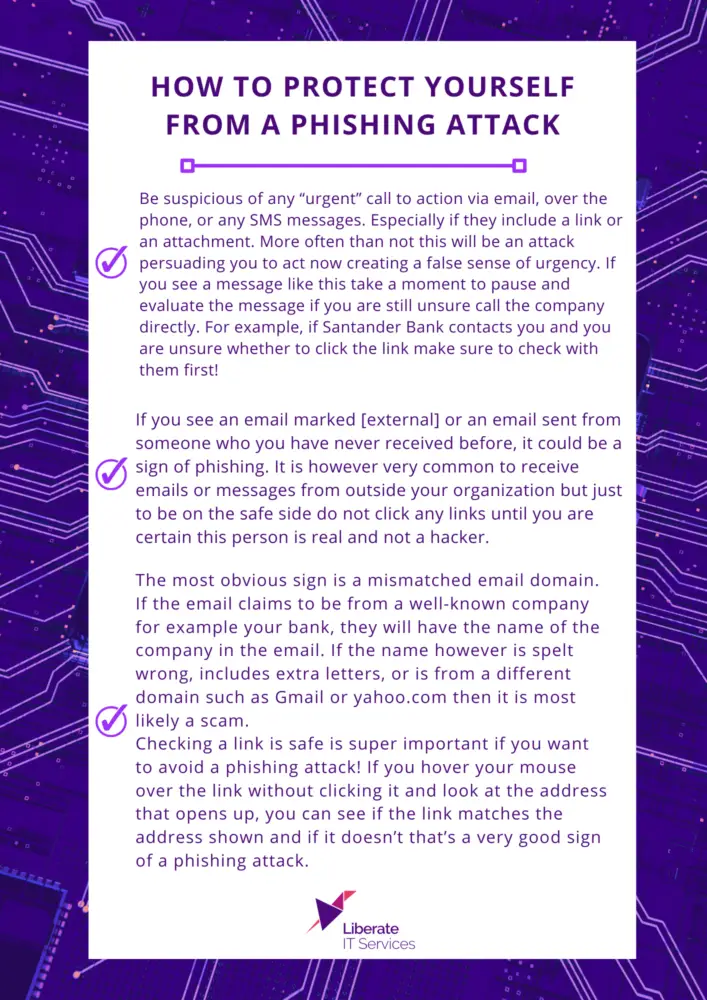
Now we know the possible signs of a phishing attack, what if its too late and you think you have been phished successfully?
What to do if you think you have been phished:
If the device is a company device then make sure you report the incident to your IT department immediately! Take your email account offline if possible to prevent spreading links to others in your contacts.
Make sure you change your password for all accounts that have been affected and if you have other accounts using the same password make sure you change those too. If you have entered bank information make sure you call your bank to let them know and prevent any misuse of your details.
Make sure that your device is scanned for malware and that all updates have been carried out to prevent any security patches from being exploited. When in doubt the best thing you can do is to make your IT department a where, and they will be able to support you and provide guidance in preventing an attack from happening again! If you currently do not have an IT department and would like support, feel free to explore the rest of our website to see who we are and how we can help you!